
Feature reference
Every screen in the application, what it is for, and the things that are easy to miss.
Dashboard
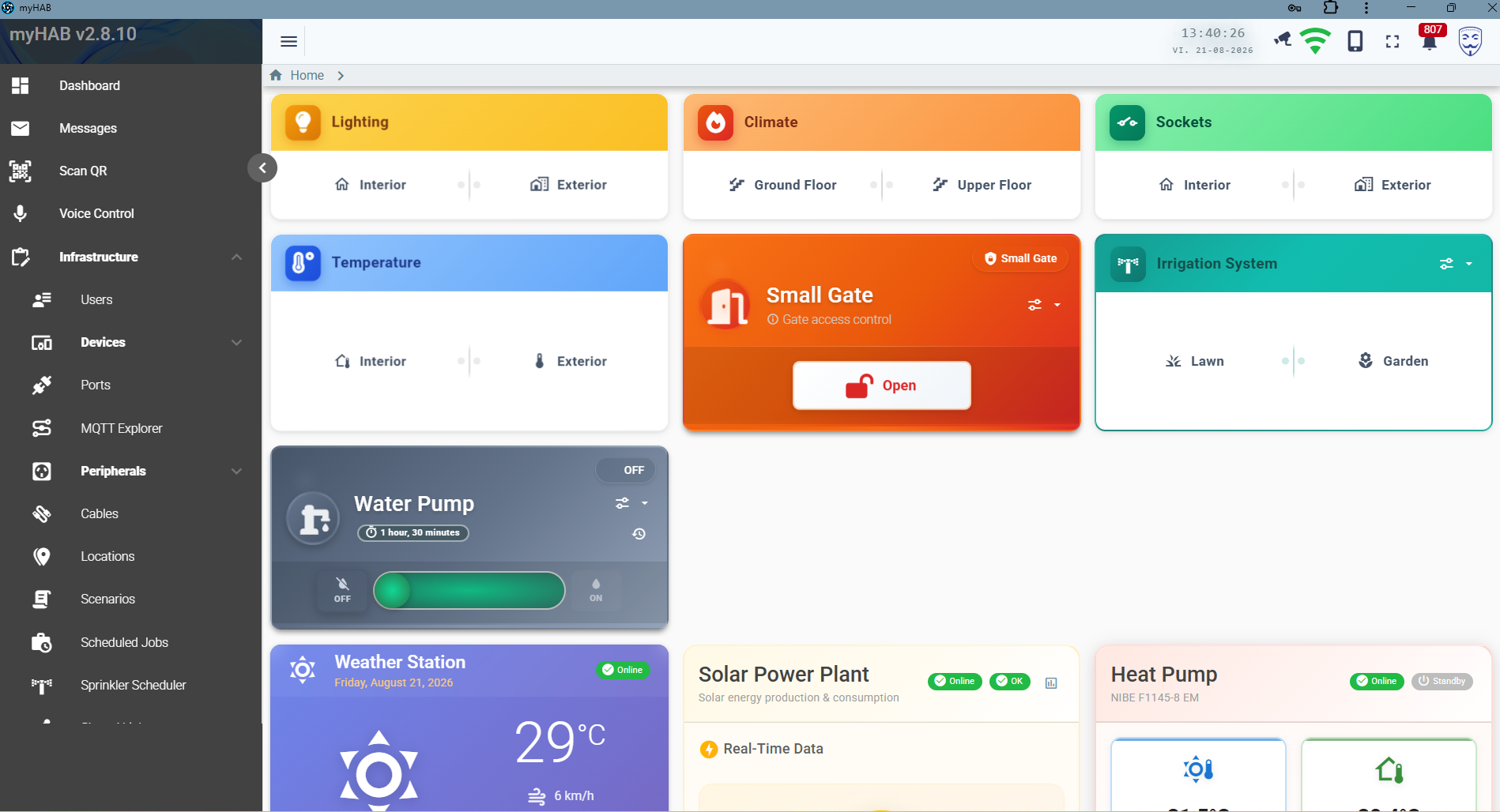
The landing screen. Cards are grouped by function — lighting, climate, sockets, temperature — and
each card offers a pair of shortcuts into the zones you nominated in configuration
(specialZones.*). Below them sit the full-width instrument widgets.
Available widgets
| Widget | Shows | Needs |
|---|---|---|
| Lighting / Climate / Sockets / Temperature | Zone shortcuts by category. | The relevant specialZones ids. |
| Gate / door lock | An open button with a confirmation dialog. | specialDevices.doorLockMain.peripheral.id |
| Irrigation | Lawn and garden zone shortcuts plus a link to the scheduler. | Sprinkler zone ids. |
| Water pump | Slide-to-run control, the remaining auto-off time, and its event history. | A pump peripheral. |
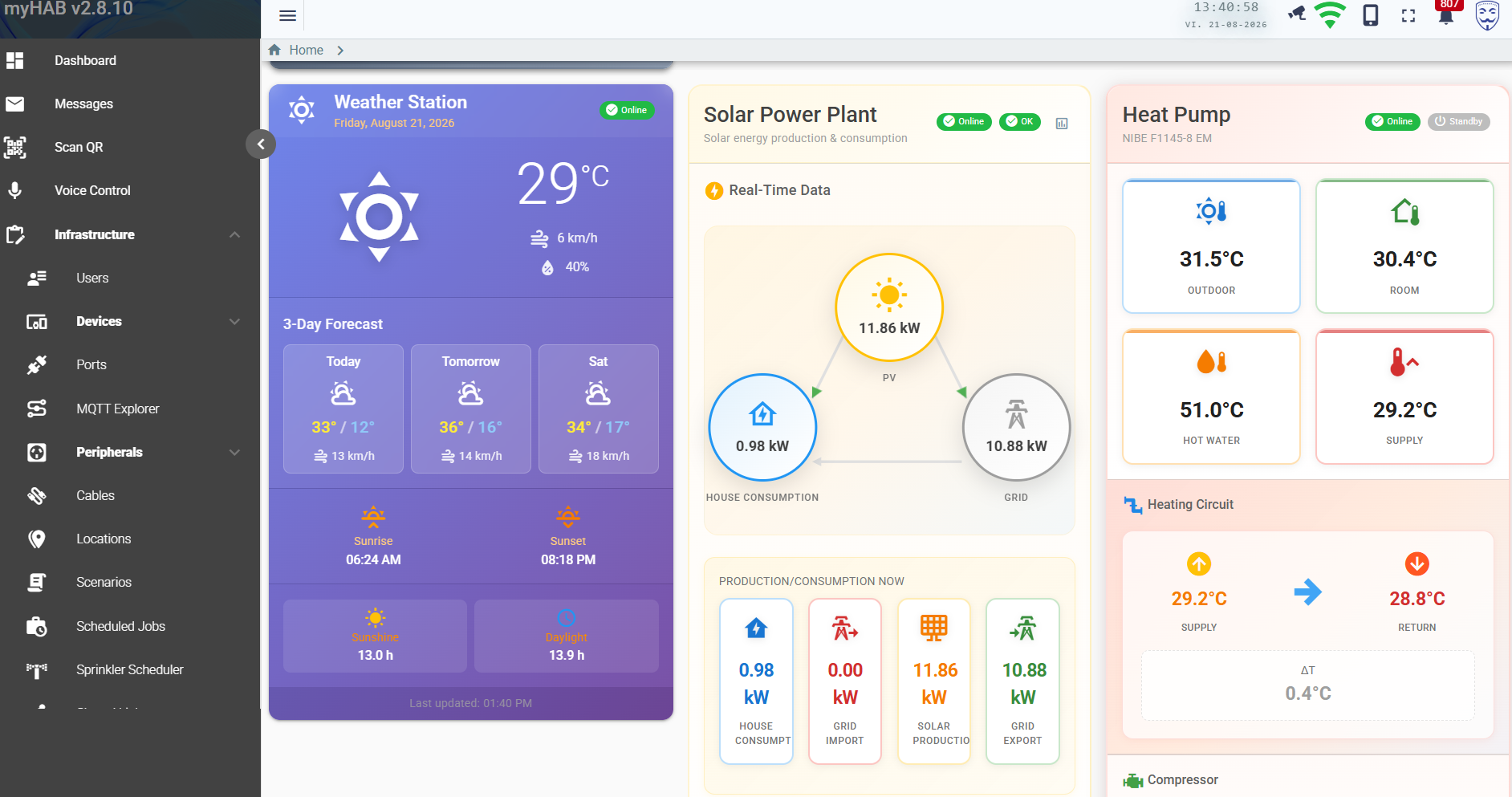
| Weather station | Current conditions, 3-day forecast, sunrise/sunset, sunshine and daylight hours. | The meteo integration. |
| Solar power plant | Animated PV → house → grid flow, plus production, import, export and consumption tiles. | Huawei integration. |
| Heat pump | Outdoor, room, hot-water and supply temperatures; heating circuit ΔT; compressor state. | NIBE integration. |
| Robotic mower | State badge, colour-graded battery bar and start / pause / resume / dock buttons. | Navimow integration. |
| Temperature chart | An embedded Grafana panel for long-range history. | grafana.* keys. |
Each widget declares the configuration it requires. Settings hides the ones whose keys are missing, and if one is already on the dashboard it renders a “not configured” placeholder — with an inline picker for admins — rather than mounting with a null id and failing silently.
Zone view
Drilling into a zone gives you every peripheral in it, rendered as the right kind of control for its category:
| Category | Control |
|---|---|
LIGHT | Toggle, with colour controls for RGB fixtures. |
SWITCH | Plain on/off with state and last-changed time. |
HEAT | Setpoint and current temperature. |
SPRINKLER | Run control with duration, linked to the scheduler. |
TEMP | Read-only sensor value. |
| Gates and locks | Pulse control behind a confirmation dialog. |
Every card carries a dropdown with its event history, its configuration, a Share access action where applicable, and a link into the admin screens for the underlying peripheral.
Floor-plan screens
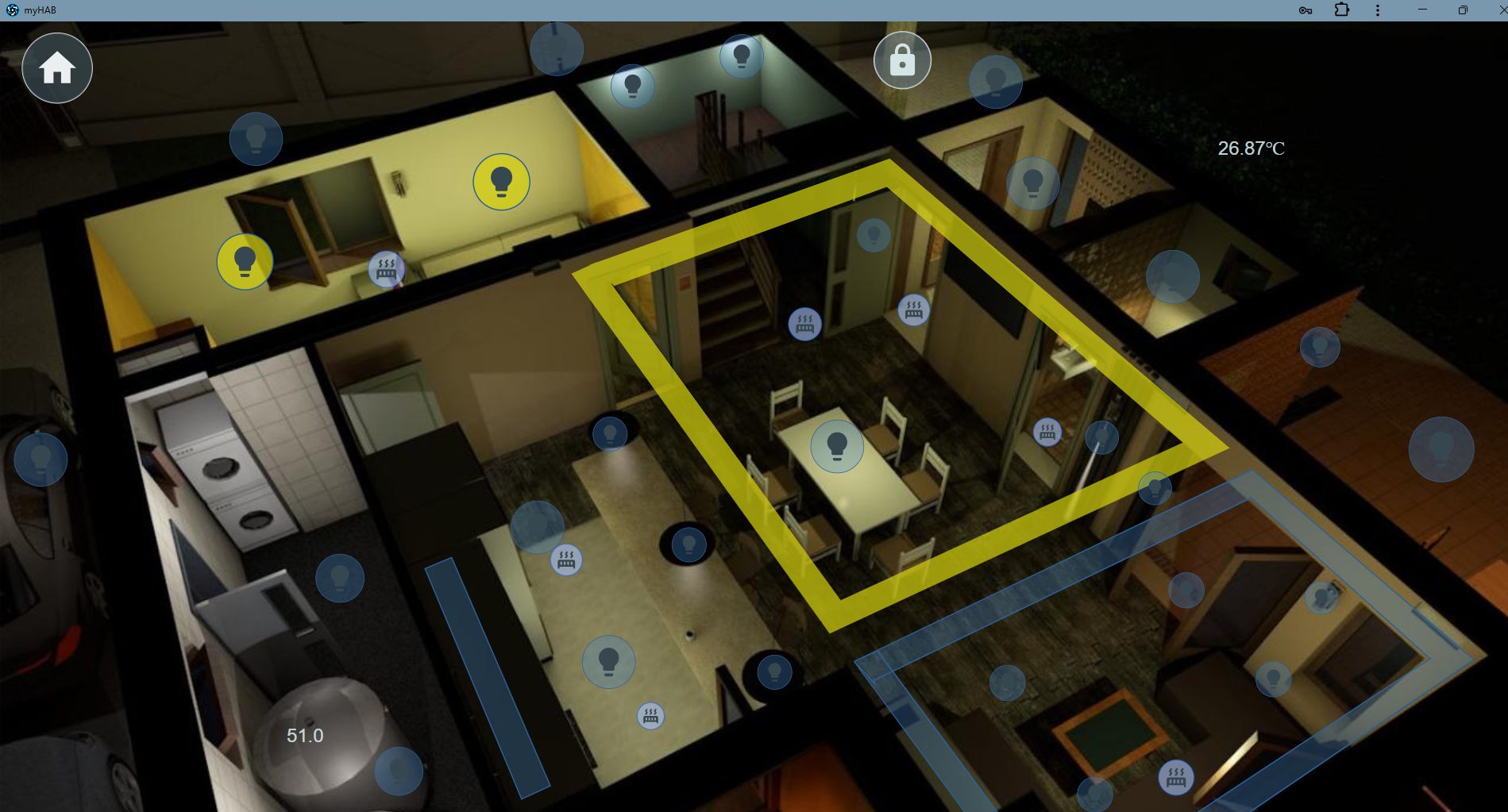
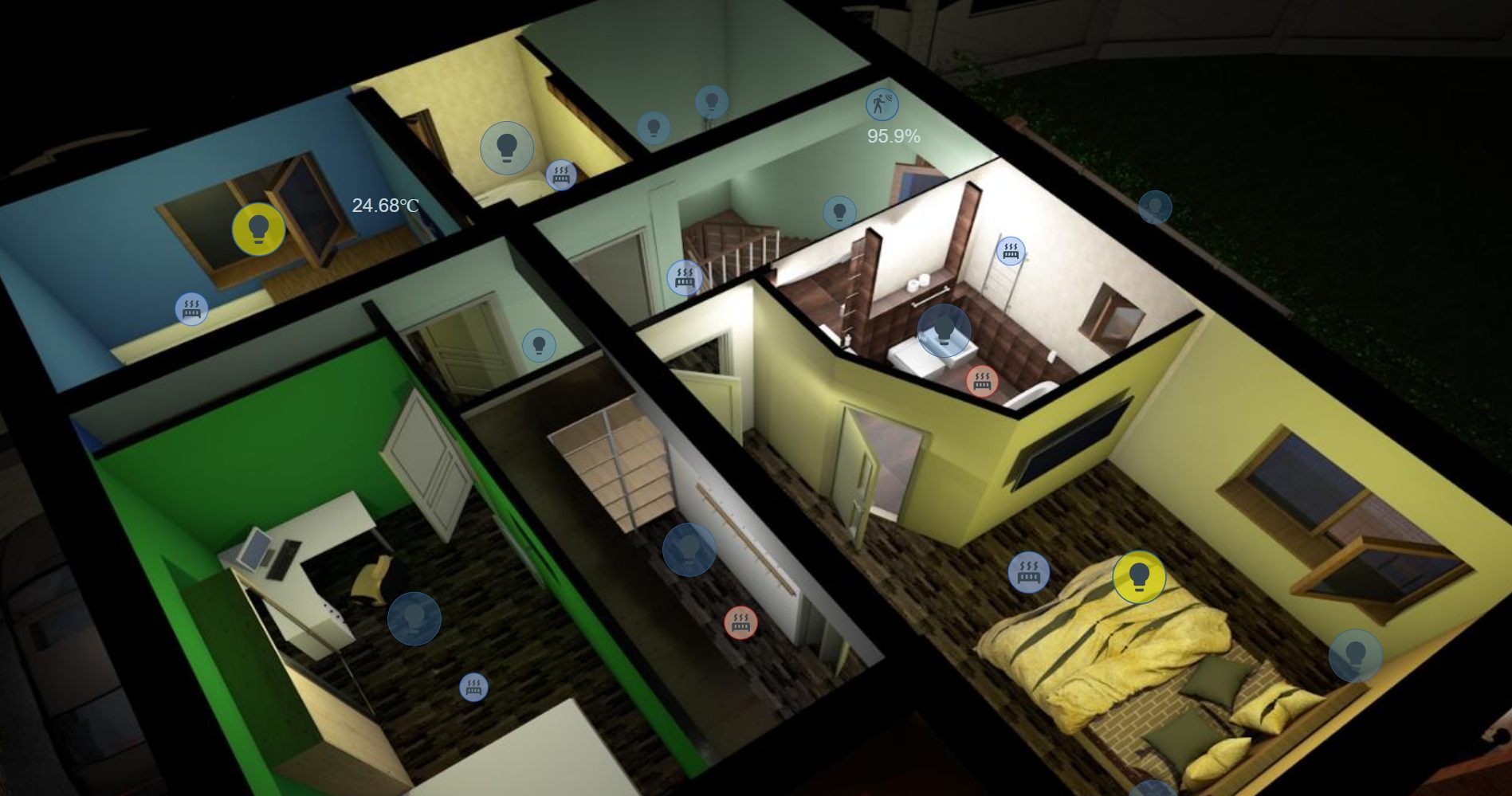
Dashboard screens turn a picture of your house into a control surface. Upload a rendering, a floor plan or a photograph as the background, then drop widgets onto it wherever the real thing is.
The editor
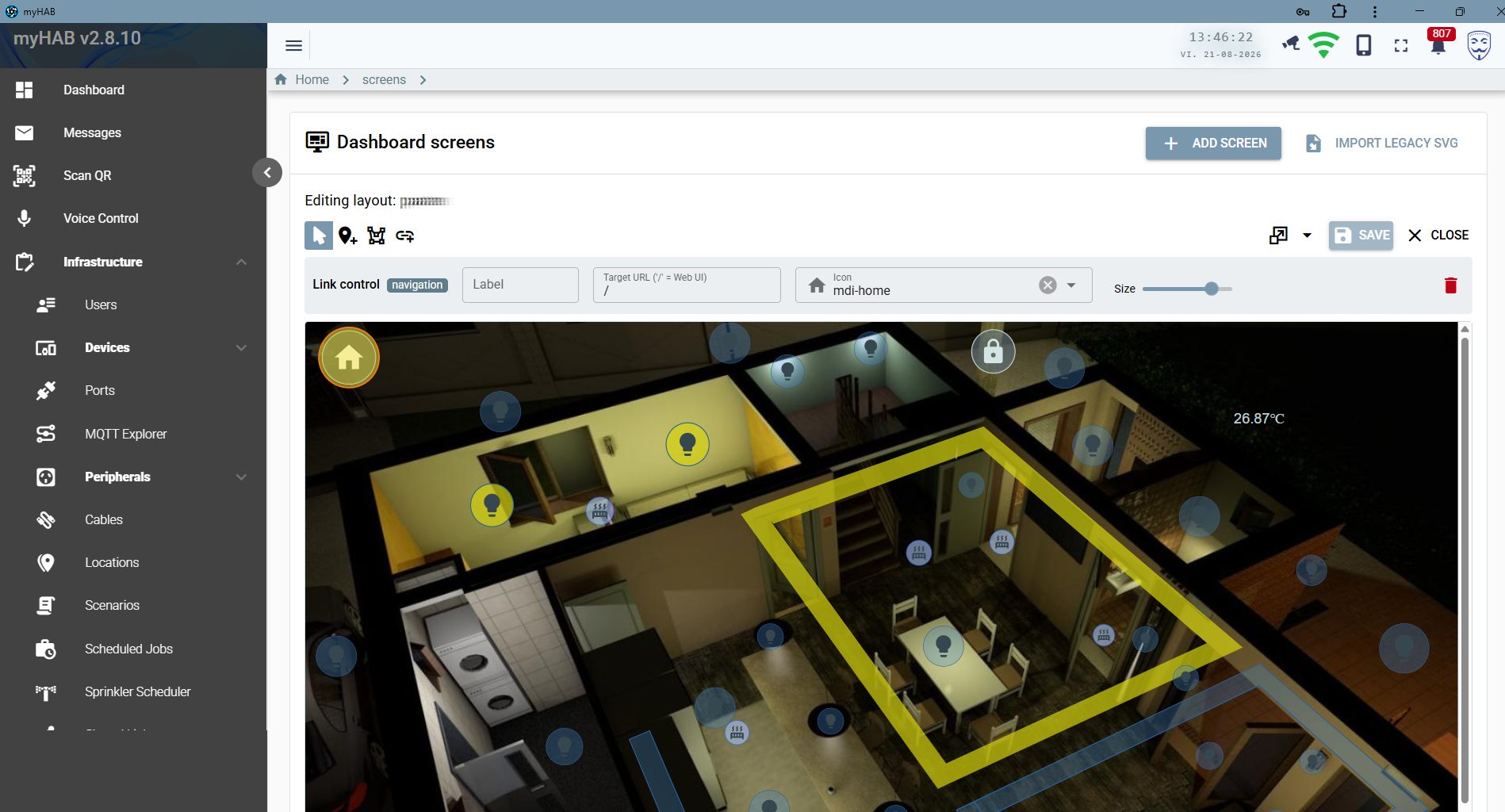
Admin → Screens gives you a drag-and-drop canvas with four tools:
- Select — move and resize an existing widget.
- Add marker — bind a widget to a peripheral or port; pick its Material Design icon and size.
- Add area — an outlined region that highlights when its peripheral is on (the yellow room outline in the screenshot).
- Add link — navigation to another screen or to any application route, e.g. a home button back to the dashboard.
Backgrounds up to 5 MB are accepted; legacy SVG floor plans (up to 8 MB) can be imported and
converted. Screens render full-screen at /wui with no chrome, which is what you want on a
wall tablet.
Infrastructure management
The admin side of the application, where the installation is described.
| Screen | What you do there |
|---|---|
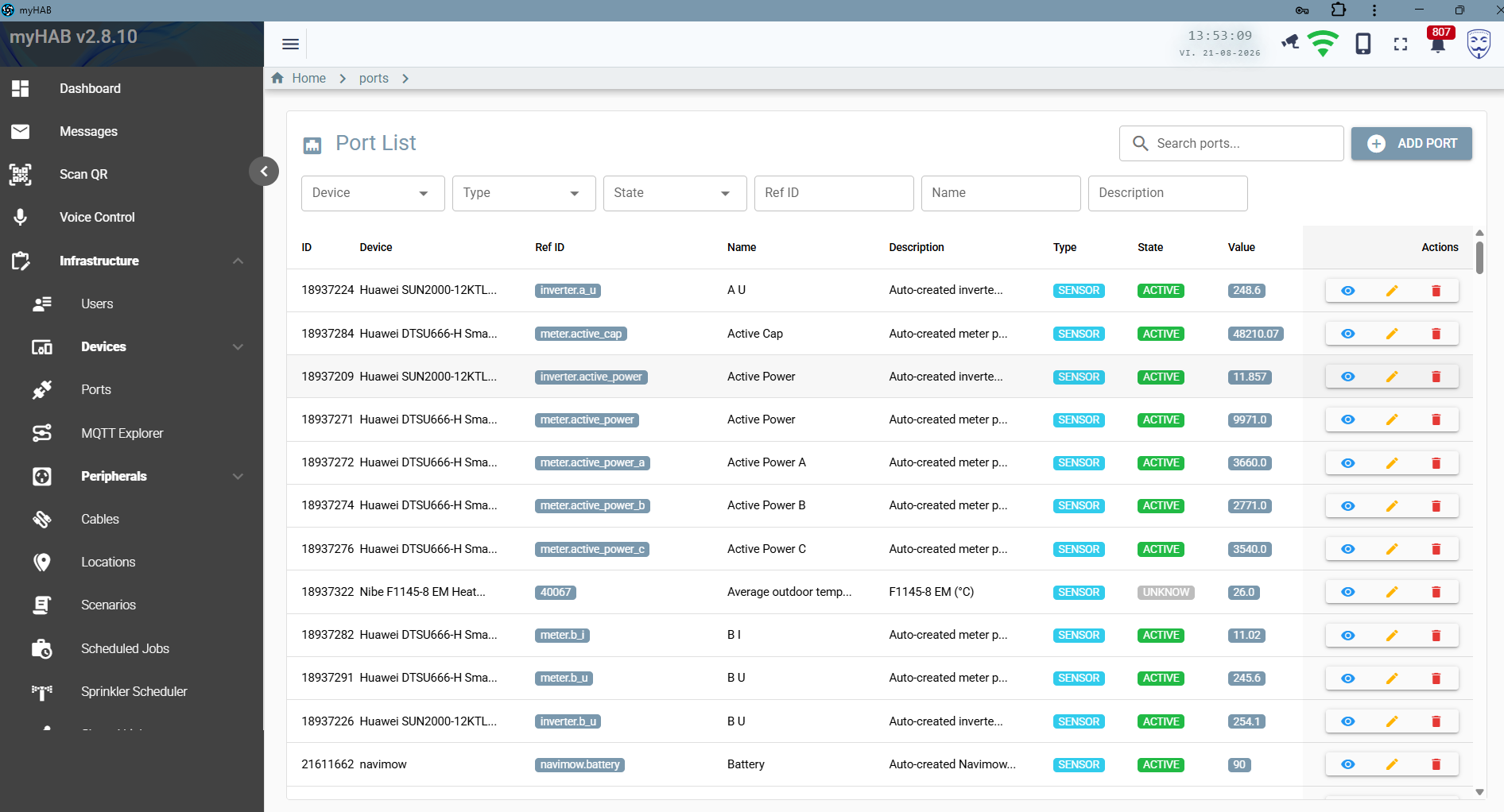
| Devices | Create controllers, set their model and code, assign zones, hold credentials, back up device configuration, view online/offline status. |
| Ports | The full I/O inventory across every controller — filter by device, type or state; see the last value inline. |
| Peripherals | The human-facing things. Category, zones, connected ports, voice aliases, auto-off timeout. |
| Cables | Physical runs between ports, patch panels and peripherals. Printable as labels. |
| Locations | Zones and layers, nested to match the building. |
| Users | Accounts, roles, Telegram username linkage, per-user language and timezone. |
| Scenarios | The DSL scripts themselves, with an editor and a run button. |
| Scheduled jobs | Cron and event triggers bound to scenarios, plus execution history. |
| Screens | Floor plans and the widgets on them. |
| Shared widgets | Every guest link, its usage and its audit trail. |
| App configuration | The git-backed configuration store, edited in place. |
| QR settings | Whether labels carry a QR code, what it encodes, its size and position. |
MQTT explorer
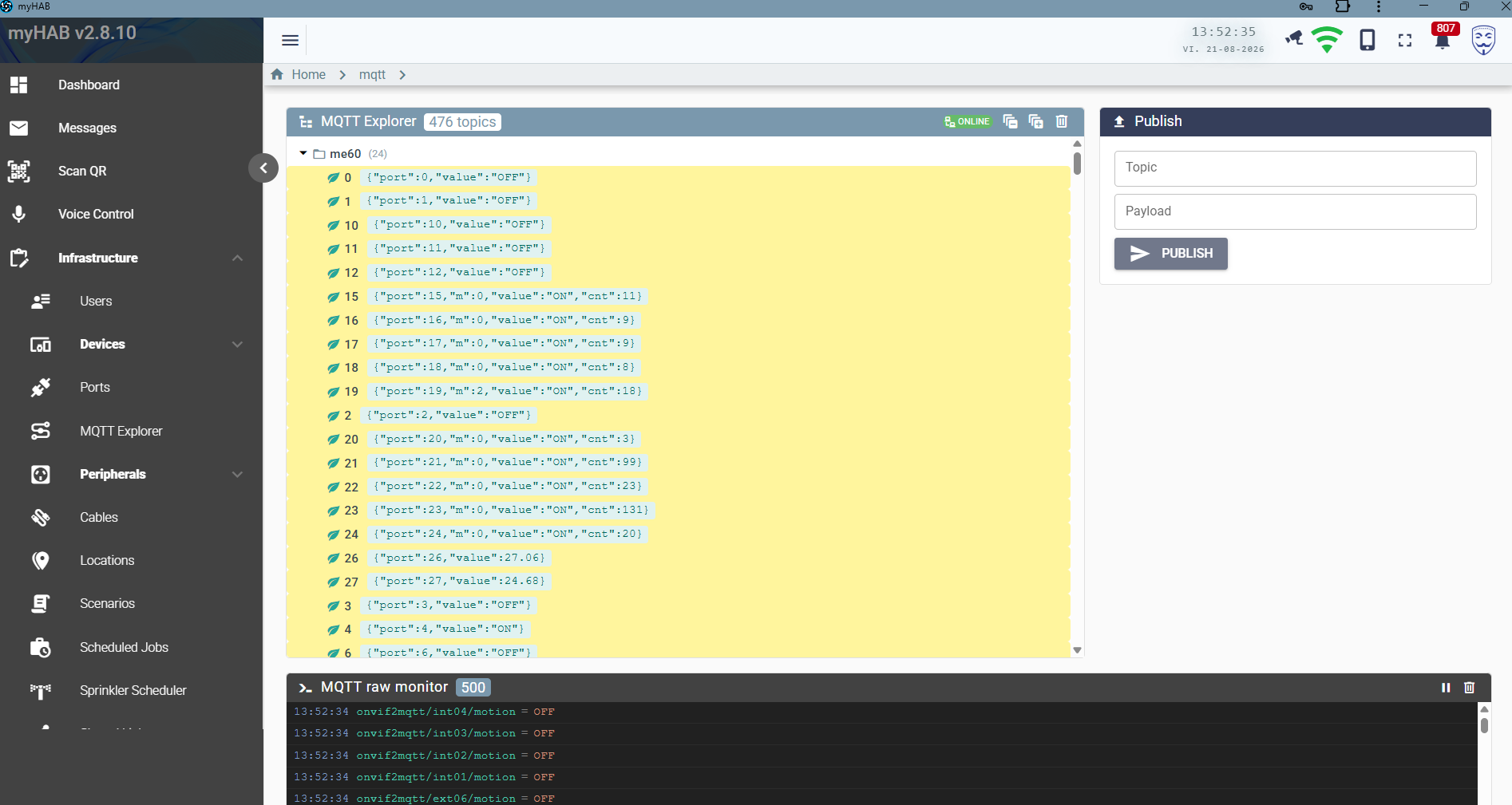
A broker inspector built into the application, so diagnosing a device does not mean SSHing somewhere
with mosquitto_sub.
- A live tree of every retained topic, grouped by prefix, with payloads shown inline and a count per branch.
- A rolling raw monitor of the last 500 messages, pausable, with a clear button.
- A publish form for sending an arbitrary topic and payload by hand — the fastest way to prove whether a problem is the device or myHAB.
- Connection status, and controls to copy or purge retained topics.
Messages and notifications
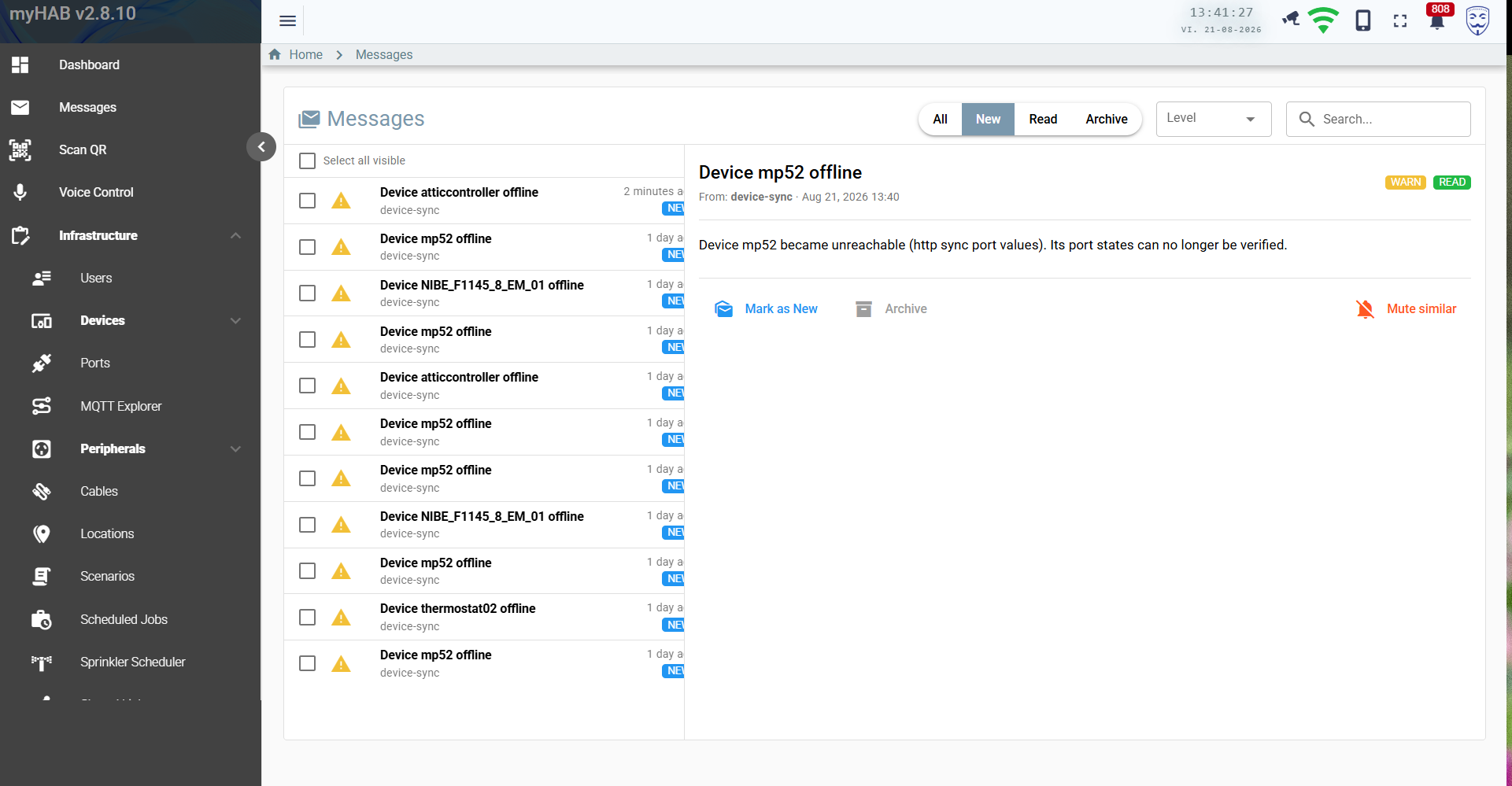
myHAB keeps an inbox rather than firing transient toasts. Device-offline warnings, integration errors, token-expiry notices and mower events all land there with a severity level and a source.
- Filter by New / Read / Archive, by level, or full-text search.
- Mute similar creates a per-user notification rule: matching messages skip the inbox and the push notification and are filed straight as read or archived.
- Rules are evaluated in the single place a message is ever created, so they apply to every producer — including ones added later.
- Rules are strictly per-user and are not exposed through the generic CRUD API, so nobody can read or delete anyone else's.
- With VAPID keys configured, unmuted messages also arrive as Web Push notifications on subscribed devices.
Sprinkler scheduler
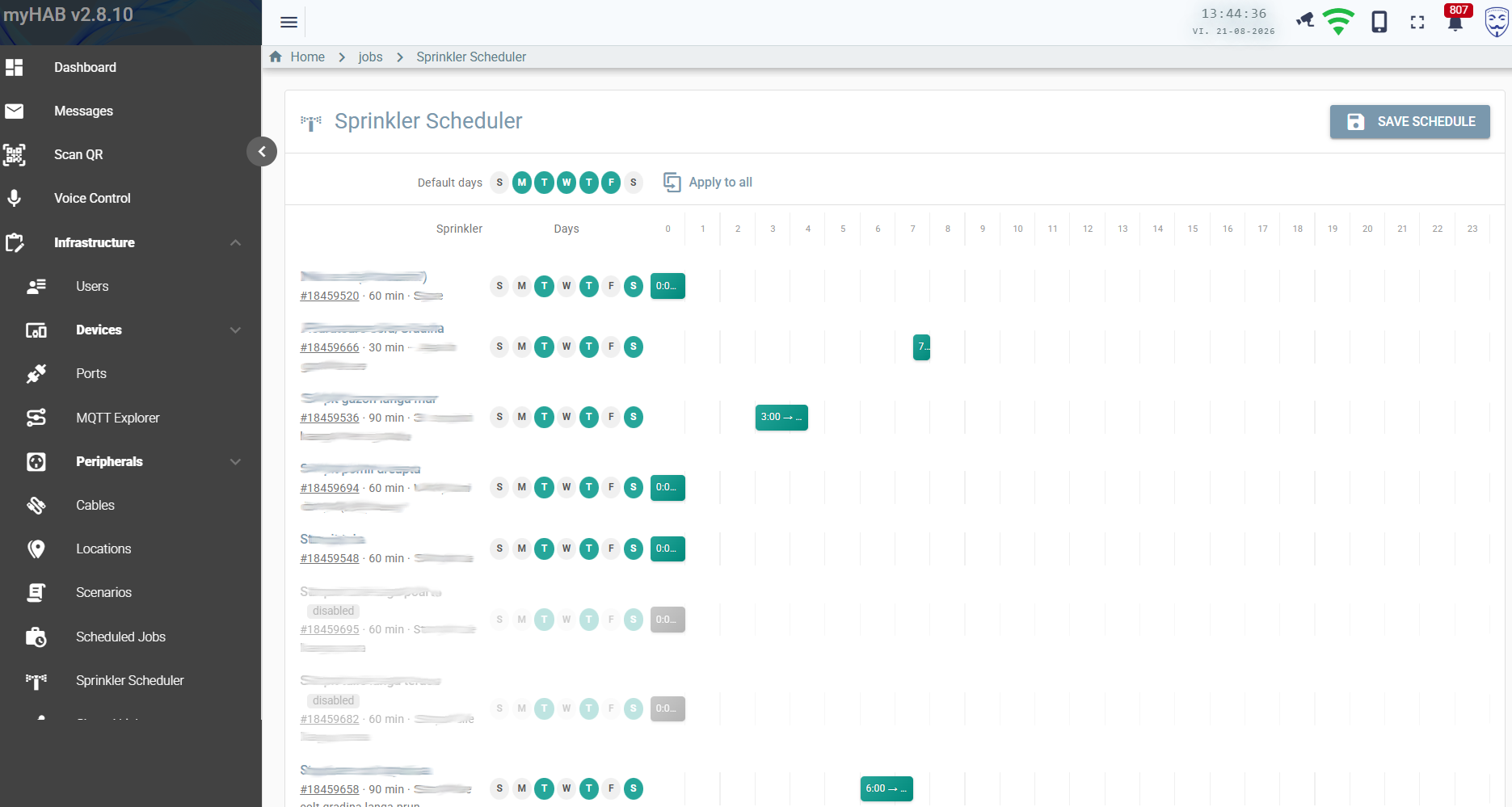
Irrigation deserves its own screen, because a cron expression per zone is a miserable way to manage a garden. The scheduler is a grid: sprinklers down the side, hours across the top.
- Per-sprinkler day-of-week mask, start hour and run duration.
- A default days row with apply to all for the common case.
- Individual schedules can be disabled without losing their settings.
- Each row links to the underlying job, so you can see its execution history.
- Saving writes real Quartz cron triggers — there is no second scheduling mechanism.
QR labels and scanning
Print Brother-style labels for cables, devices and peripherals, optionally carrying a QR code. Scanning one in the app navigates straight to that entity.
- The QR encodes a stable, base-URL-free token —
myhab://TYPE/ID— so a printed label keeps working even if your deployment's hostname changes. - What it encodes is a template with variables, configurable alongside size and position.
- The scanner is pure web, using the device camera through the PWA. No native app needed.
Reports and history
- Solar reports embeds a Grafana dashboard for long-range production analysis. If the keys are not set, the page tells you exactly which ones are missing rather than showing an empty frame.
- Event log is reachable per peripheral: who changed what, when, from which source (UI, scenario, cron, Telegram, voice, shared link) and from which address.
- Job execution history records every scheduled run with its status.
- Time-series statistics aggregate port values hourly, daily and monthly for energy analysis.
Mobile, PWA and offline
- Installable from Chrome, Edge and Safari — it behaves like a native app with no app store involved.
- Workbox caches the shell, so the app opens instantly and shows last-known state before the socket reconnects.
- Layouts are responsive down to phone width; the floor-plan screens are designed for tablets.
- Updates are picked up automatically when a new version is deployed.
Language and personalisation
The interface ships in English and Romanian. The choice is stored on your account, so it follows you to every device you sign in from; left on Automatic it follows the browser and falls back to English. The same setting drives speech recognition and the voice assistant's spoken replies.
Timezone is a per-user preference too. Everything is stored in UTC and rendered in yours.